Time Auto Increment
Auto Increment Time Feature in ePCRIV
Overview: The Auto Increment Time feature in the ePCRIV system by Elevos allows users to automatically increase time values across multiple fields based on a configured increment. This feature is particularly useful for ensuring consistent time entries across mandatory fields.
Location: Feature is located in epcriv.com>ePCR>Time & Mileage>Times
Configuration:
- Enter Time Value:
- Type or select a value for the field PSAP Call Date/Time at minimum (If additional time fields are registered in the left column, the time calculation will begin from the last field entered.)
- Set Increment Value:
- Navigate to the Auto Increment Time Field (Second field on left column)
- Enter the desired increment value in seconds. (Value between 0 and 999)
- Increment Time:
- Once the increment value and the time field value or values are set, click on the "Increment" button.

All mandatory time fields will be automatically increased by the configured increment value. (Fields marked with a red asterisk)
Manual Adjustments:
Users can manually set the value for all the date and time fields.
Additional fields on the right column can also be manually adjusted as needed, but they are not going to be affected by the Auto Increment feature.
Example Scenario:
Increment Value: 30 seconds
PSAP Call Date/Time:: 10/15/2024 08:00:00
Action: Clicking the Increment button will increase all mandatory time fields by 30 seconds from the minimum time of 08:00 AM.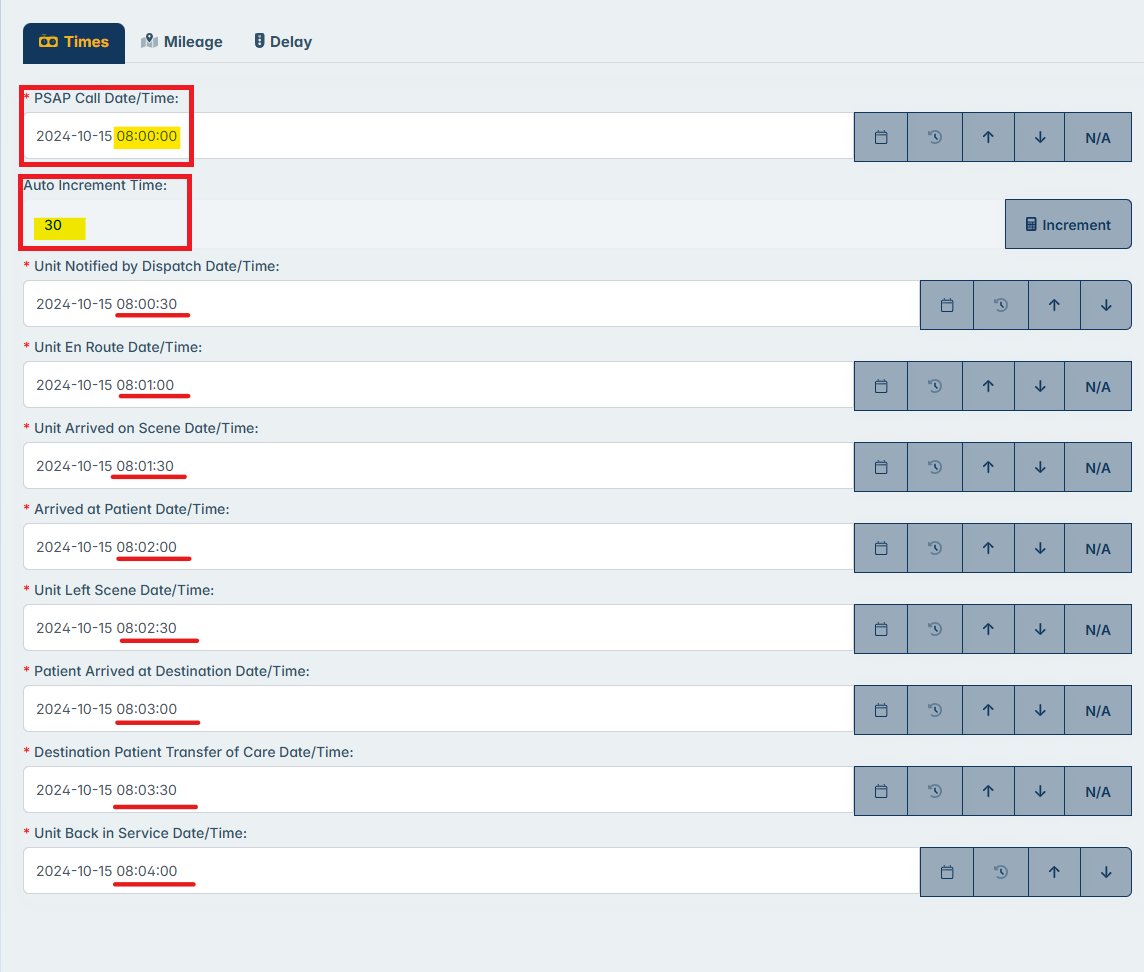
Benefits:
Ensures consistency in time entries.
Saves time by automating repetitive tasks.
Reduces the risk of manual entry errors.
Support: For further assistance, please contact our support team at support@elevos.com.
Related Articles
PCR Short Form (60 seconds form)
Introducing the ePCRIV Feature: Short Form The ePCRIV software has introduced a convenient new feature called “Short Form,” designed to expedite the patient care reporting process. This feature allows users to quickly create a concise Patient Care ...Billing Reports Feature
The Billing Reports feature allows users to access Billing Reports directly through epcriv instead of having to use ehradmin. The Billing Reports feature is located on epcriv.com under the Billing dropdown in the left menu. When accessing the Reports ...Shared Files Feature
The Shared Files feature allows users to organize documents in one space. In Shared files, users will be able to upload, download, and delete files from their agency. Shared Files is located on epcriv.com under the Billing dropdown in the left menu. ...Patient Multi-Signature (Bulk Signature)
Patient Multi-Signature (Bulk Signature) The patient Multi-Signature feature allows multiple signature reasons to be signed simultaneously for patient only, streamlining the process for both patients and healthcare providers by requiring a single ...Lesson 11 - Time and Mileage Tab